Tuesday, 18 March 2014

New Release, (Build 14)


I have upgraded it to Build 14. The changes since the last one are :
  • Added checksums for all known cartridges that are dumped in their current state. If this changes because dump errors turn up, the paddles will work differently.
  • Sea Duel now displays the flag properly (see the 2nd picture from the left - it's meant to be the Stars and Stripes ....). The LCD latency trackers do not change when there are no addressable->output latches in a frame - static displays with only one row/column pair.
  • Sea Duel now plays the tune (albeit it sounds terribly stuttery on Windows XP/Virtualbox, though it seems fine on Mac ?).  Might be a VirtualBox issue.
  • Sea Duel assumed TMS Data Memory was all zeroes on start up, the spec doesn't say this, but it probably is in practice. I suspect this is because they aren't cleared on reset, which isn't quite the same things cleared on power up - you can reset a TMS1100 mid program, but you can't do this with Microvision games.
  • The CPU speed now is correct for some programs (Sea Duel sounded squeaky because its clock is half the speed)
  • The Paddle controls are calibrated for known cartridges, so it is possible to play Baseball which has a way-out range. Other new games (e.g. Connect 4, Super Block Buster) now enable the paddles when loaded.
  • It now starts in run mode. To run in debug mode, prefix the name with an @ (e.g. mvem @sbb.bin)
  • The screen size can be changed by adding wwwxhhh e.g. mvem mind.bin 320x200

Windows and OSX executables are downloadable from the sidebar on the right. The source is in the OSX executable (and is the same for Windows, save for the build process).

Sunday, 2 February 2014

Composite Instructions

The various how tos are all over the blog, I thought I would summarise them here.

Stuff is downloaded from the link bar on the right. It all is open source - do what you wish with it, please keep attributions however.

The Emulator

to run the emulator either ./mvem <binary> or mvem <binary>. It requires SDL2 - for Windows the DLL is included, for others you will have to go to www.sdl.org. It doesn't use anything else. The mouse control on Windows does not appear to work properly, and this appears to be a Windows problem. 

The currently available binary images are in both archives. The osx file contains the source files as well (the work was done on a Mac)

If there is an overlay bitmap file - in windows .bmp format, because this is the only format that SDL can read directly.

it boots up in debug mode - the keys are :

0-9A-F  change displayed address
G run program until broken (with M)
K set breakpoint at current address
S single step
V step over
M return to monitor (if running)
Esc exits the debugger

When running, O & P control the paddle,  and 123QWEASDZXC are the Microvision keys. If you write home-brews on it that use the paddle, or have the reversed output as Vegas Slots does, you will have to hard code this in the emulator - each ROM image has a checksum which determines whether it has the paddle hardware or not, what the charging times are (best way to do this is trial and error) and whether the output to the LCD driver is back to front or not. 
 
The Assembler
    
The Assembler is a lua file called tmsasm.lua , which assembles TMS1100 assembler - it is basic but it works. There are plenty of sample codes to see, but the basic differences to some others are :

there are no expressions  - you cannot write tcmiy label+1 for example
ldp, br and call extract the right bit from the address used, you do not have to modulo 64, or divide by 64 modulo 16. 
No support is provided for chapter bits outside comc, obviously. High chapter usage is shown in the space invaders source, which is mostly in the upper chapter.
lbr and lcall are shorthands for ldp x; br x and ldp x;call x respectively.
 
The hardware version

The hardware version requires a directory with the .ino file, the header files copied from the OSX emulator and absolute links to include the C code from the OSX emulator version. Relative links don't work. You can see this in the .ino file. It is designed for a 328 based Arduino (e.g. Duenamolive in this case) but it should work okay on most Arduinos or other MCUs really , all it does is scan the various hardware bits. The .ino code just translates hardware calls into Arduino compatible ones. 

The wiring is very basic. It uses a LCD4884 shield, available from most of the usual suspects. The buzzer is connected to Pin 8 via a 100R resistor , and the keypad as follows:

Arduino 13 -> Keyboard 3 (C0)
Arduino 12 -> Keyboard 1 (C1)
Arduino 11 -> Keyboard 5 (C2)
Arduino A5 -> Keyboard 2 (R0)
Arduino A4 -> Keyboard 7 (R1)
Arduino A3 -> Keyboard 6 (R2)
Arduino A2 -> Keyboard 4 (R3)

The keypad is one of those stock 3 x 4 keypads available cheaply from most suppliers with rows : 123 456 789 *0#


Saturday, 1 February 2014

Next up .... this

In the ever moving down the game system coding ladder, this is my next target.

It's called the 'Entex Select-A-Game'. This one is colour, sort of, on a 16 x 7 Grid - so it is half the resolution of the Microvision.

Wednesday, 29 January 2014

Round Up

Overall, I'm quite pleased with this RetroChallenge, after the mess of the last one anyway, which never really got restarted when I went on holiday.

I achieved most of what I planned - emulator, new game (actually two) and an Arduino version.

The 8021 was about 3/4 completed, but I never really went anywhere with it. It's more challenging to write for a TMS1100, and it's supposed to be a challenge.

It went a bit sideways in the middle, when the ROMs turned up. People have been thinking about home-brew Microvision games and emulators for years, but nobody dumped the ROMs even though it was known to be possible, and then two came along at once.

Thanks especially go to : Sean Riddle, Kevin Horton and Dan Boris.


Final Code Release

Must be a boring film....
So, another Retrochallenge month comes to an end.

I've updated everything and rebuilt everything. The emulator has changed slightly, not bug fixes but changes to work with the Microvision / Arduino in the source, mainly to do with types (I forgot Arduino ints are 16 bits, longs 32 etc.). The main problem was that the rotary control only worked about 2/3 off the screen (due to wrap-around in the integer).

One mistake was that I put the rotary control checking stuff in the SDL hardware driver, so that came out and went where it belonged in the shared code.

Microvision.ino is a new upload. This is the Arduino file and is the extra bit you need besides the original source. Arduino doesn't really like complex project structures (not that this is complex) so you have to copy the header files from the source in and include the two shared files as a direct address link (e.g. the full path). It doesn't seem to work otherwise.

The last upload is a big one, 66Mb in size, it is the complete project tree off my machine, which contains everything.

I really must learn to use github and so on for the next project.


Sunday, 26 January 2014

Saturday, 25 January 2014

Hardware Version, progress report #4

10k Pot added to the breadboard
Well, I think I've pretty much finished.

I found a 10k Pot in my box, from memory it was one of a batch I bought to repair a Microvision unit where the rotary controller was broken, and wired it into the remaining analogue port, and it plays fine.

Sound and Graphics work okay. There are a few minor graphic problems which relate to the incomplete emulation of the LCD.

Tomorrow I'll try the full LCD latency emulation and see how it works, it might well still be quick enough.

I will pinch our camera and make a video of some sort of the game being played, so you can see it is for real :)

One thing I forgot is that gcc-avr and gcc-x86 have different ideas about how big ints, longs and so on are - this was causing an overflow on the potentiometer calculations on the AVR, but it now all seems fixed and running nicely.


Hardware Version, progress report #3

After a lot of cursing regarding the Keypad library - the people who wrote it, it didn't seem to occur to them to have a simple 'is a key down' test, which is pretty helpful if you are programming games, I've got the keypad working.  I might just chuck the keypad library and access the controls directly, rather like the LCD4884 library it is a bit limited.

I've also added the sound, which worked very well. The thing now beeps at me if I leave it alone though, Microvision carts do this to warn against battery usage.

So in BlockBuster you can now set the parameters and start the game up, of course you can't play it because I have done the pot (yet).

I always found Block Buster really difficult anyway, even on a real Microvision.

Hardware Version, progress report #2

Dracula has risen from the grave
More progress this morning. As you can see from the photo on the right, the Emulator now seems to be working okay under the Arduino. The beeper and keyboard don't work yet. I will try and getter picture later on, but it does display "7 ST" which is the opening screen of Block Buster.

If I'm going to test it with Block Buster I'm going to have to add the potentiometer to the circuit, I think I have a few in the spares box somewhere.

It took longer than I though, because when I actually came to look at the LCD4884 library it is pretty useless except for drawing text (actually it doesn't do anything else at all !), so I had to grab the driver data sheet and poke the controller directly. This ended up being beneficial as the "dirty screen code" ended up being optimised for the way the controller worked, not the way the library worked.

Strange fact of the day : My watch was an hour fast for most of yesterday and I didn't notice......

Friday, 24 January 2014

Hardware Version, progress report #1

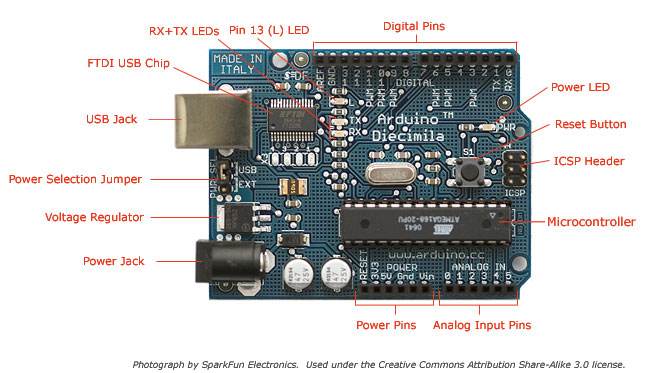
Arduino board
Some progress on the hardware. The code is built and running on the Arduino, and it appears to be working. I've not written any of the actual rendering code, but dumping what the LCD should be to the serial port shows that the rendering data is correct.

So if I actually dump that status to the LCD, then I should be getting (hopefully) the start up screen on the display.

The Arduino thing is a bit annoying. The 'IDE' is nice and easy if you just want a few simple bits, but try anything complicated and it just falls apart. The only way I can figure out to cross compile without abandoning it altogether is to #include the C files with a full path name (presumably because it copies source somewhere else - gawd knows). If you put the C files in the directory it compiles them, but bizarrely doesn't link them in.  The Arduino is a great bit of hardware, and so is avr-gcc and avrdude, but the Arduino toolkit outside that is messy.

(One of the things I hate about the Mac is that there isn't a bl**dy key with a hash on it on the standard keyboard. So typing in #include or whatever means you have to press ALT 3. It's really annoying. The big keyboard has one but isn't wireless......)

The implementation is going to be pretty basic. I hacked the emulator so it dumped an include file line creating the ROM image in Arduino ROM if you precede the file name with an 'at'. That then is included into the source code which is compiled and uploaded.


Hardware Prototype

Microvision 2014
I now have a working hardware prototype. It is an Arduino Duemanolive (or however you spell it....), a Piezo Beeper, a 100R resistor for the Beeper, the LCD48x84 Shield and one of those cheap 3x4 keypads.

The shield plugs on the top, the beeper is connected to Pin 8, and the keyboard is connected as follows:

Arduino 13 -> Keyboard 3 (C0)
Arduino 12 -> Keyboard 1 (C1)
Arduino 11 -> Keyboard 5 (C2)
Arduino A5 -> Keyboard 2 (R0)
Arduino A4 -> Keyboard 7 (R1)
Arduino A3 -> Keyboard 6 (R2)
Arduino A2 -> Keyboard 4 (R3)

Leaving A1 free if I ever decide to implement the rotary control (which would just be a pot on there !). I make use of three libraries, Beep (included as standard) LCD4884 (v1.2) and Keypad


Release 11

A new release of the Emulator, for Windows and OSX and Linux probably. Source is in the OSX bundle.

What's new :-

  • Support for Pinball Game
  • Support for Overlays (included for Pinball)
  • Paddle controllable by Mouse
  • Game main display enlarged

For some reason the paddle control by mouse does not work under Windows. I don't know if this is SDL, VirtualBox (I build under XP/VirtualBox) or me - it seems to work perfectly under OSX and the code is very simple, a call to SDL to tell it to pass events on and a bit of code to change the rotary control in response to those events.

I will have a look later on.

Overlays have to be in .bmp format (same name as cartridge) unfortunately as it's the only format that SDL will load without support libraries.

Overlays and Mouse control added.

Made some changes this morning - the main ones  you can see here. When running the display now takes over about a quarter of the screen rather than just being up in the corner (still there for debug mode) & I got rid of the grid (useful for debugging but not otherwise), and the overlay is over the display.

The mouse also controls the paddle - you can still use O & P but this is much better.

I have one fix to make later - the pinball rotary timing is different for the Pinball cartridge, this manifests itself as not being able to go to the right hand last quarter, which makes playing the game difficult.

For some reason, probably the scanning of the overlay being a cm or two off the scanner surface or possibly the blurring or both, the circles aren't in quite the right position, but then this was only a quick hack up of the overlay anyway. My coding skills aren't bad, but I cannot draw at all. I think this is why I quite like coding games for these sorts of machines ; put me on a PC or Tablet and the graphics talent shines through, sort of ...

I will update everything when I've fixed the Pinball timing, which will be later today sometime hopefully.

Couple of ideas

Knockup Pinball Overlay
Couple of ideas appeared in the comments today. A great idea to use the mouse for the paddle controller, and Pinball. Pinball really needs the overlay to be playable, so I ran a cartridge through my scanner (so I can get the scale right !) and painted in the areas to get a very rough and ready copy of the pinball overlay as a PNG.

So today or this weekend I'll get that up and running and make the mouse control work.

Thursday, 23 January 2014

Everything now current again.

So, everything has been updated on the right apart from the old data sheets - everything is, I think current.

The main changes is that the Emulator now has a proper latency implementation. The picture on the right (Bowling again) shows the two pixels rather than one, and it doesn't flicker like the optimised one does.

The Space Invaders source has been packaged with a Binary and updated (it does run on MESS) and so has the system library, though I don't think that's been updated since the last time I used it.

Windows, OSX and source versions are available. Linux users should fine it compiles fine from the OSX sources. Windows users who want to compile it, well, good luck !

Space Invaders uses three keys, one from the left row, one from the middle, and one from the right. You move with left and middle, and fire with right.

To get off the static score screen press Left/Right (e.g. Left and Middle on the keyboard) at the same time.

It doesn't matter which row you use .... I've got 1k of code to fix the key routines if anyone really minds.

Too smart for my own good.

This is the Microvision Bowling Cart which was dumped in the last day or two by Sean R.  by the carve the top off and take a picture with an electronic microscope method.

Unfortunately it didn't work properly on the emulator. A couple of easy fixes - it has the 'reversed output' like Vegas Slots,  and there were a couple of error bits that meant it went haywire.

But it kept flickering - switching 45 degrees all the time. I thought it was a timing bug or possibly a polarity reversal issue. MESS was fine (albeit the data was bit reversed) and MESS doesn't do the polarity reversal, not that it actually matters, you can't have too much DC in an emulator.

It was actually my try-to-be-too-smart optimised LCD code, which tried to second guess the programmer as to whether they were writing vertically or horizontally or both to the LCD controller. It got it right, but this cartridge, technically does both, sort of. The top left most pixel should be set as well as the one below it, but because it does multiple writes to these lines, it got confused, and switched between the two all the time. So sorry, that was really dumb and I hope I haven't wasted too much of Sean's time.

So my plan X is to write a proper LCD rendering routine and use that for the PC based emulator and the row one for the Arduino (I don't think it could do a pixel based one and keep up). This isn't hard, my optimised version treats a row as a single entity with a single entity whereas in reality each pixel has its own latency. This will mean the bomber game which draws everything as columns won't work on the Arduino.

Once I've done that I will update everything, rebuild the Windows version and so on.

Then maybe this weekend I can see if I can build the hardware version.


Wednesday, 22 January 2014

Space Invaders ... completed.

The game is basically finished, coming in at exactly 1,000 bytes, slightly less than half the ROM space of the TMS1100.......

I'll update all the code and stuff after I've tested it a bit more, but it seems to basically work fine.

Space Invaders Session 4

It's now basically playable. The screen shows a game in progress.

You can shoot the invaders - they shoot back.

There's no end of level, or invaders landing test yet, and if you are hit the game just freezes.

But that's for another session, tidying up, displaying the score and lives, and so on.

Current code size is about 900 bytes of a 2k ROM, and just over 1000 lines of TMS1x00 assembler in four files. The current version (zipped) is downloadable from the links on the right, obviously it isn't finished yet.

I haven't tried it on the MESS emulator yet, I did try Bomber and that works fine. It should actually work better because MESS emulates the pixel latency properly, mine's a short cut.

In other, err.... news, Sean has decapped a BlockBuster and examined the PLA, confirming visually what we thought was the case anyway, that the PLA inverts the output on Vegas Slots (or to be more precise, every other game so far inverts the outputs !)

Space Invaders, session 3

Not Microvision Graphics btw.
I can now shoot the invaders, and keep score. Now need to get them shooting back - and tidy up - check for level over, landing, shot etc.


Tuesday, 21 January 2014

Space Invaders, Session 2

Little progress today - the base at the bottom can move and you can 'fire' a missile, though it doesn't actually go anywhere yet :)

Should do a bit more tomorrow.

L8R: Got it moving up the screen, and detecting the rows, now need to match the position to the row bits.