A short (1 minute) video showing the Microvision on Arduino running.
Sunday, 26 January 2014

Saturday, 25 January 2014
Hardware Version, progress report #4
 |
| 10k Pot added to the breadboard |
I found a 10k Pot in my box, from memory it was one of a batch I bought to repair a Microvision unit where the rotary controller was broken, and wired it into the remaining analogue port, and it plays fine.
Sound and Graphics work okay. There are a few minor graphic problems which relate to the incomplete emulation of the LCD.
Tomorrow I'll try the full LCD latency emulation and see how it works, it might well still be quick enough.
I will pinch our camera and make a video of some sort of the game being played, so you can see it is for real :)
One thing I forgot is that gcc-avr and gcc-x86 have different ideas about how big ints, longs and so on are - this was causing an overflow on the potentiometer calculations on the AVR, but it now all seems fixed and running nicely.
Hardware Version, progress report #3
After a lot of cursing regarding the Keypad library - the people who wrote it, it didn't seem to occur to them to have a simple 'is a key down' test, which is pretty helpful if you are programming games, I've got the keypad working. I might just chuck the keypad library and access the controls directly, rather like the LCD4884 library it is a bit limited.
I've also added the sound, which worked very well. The thing now beeps at me if I leave it alone though, Microvision carts do this to warn against battery usage.
So in BlockBuster you can now set the parameters and start the game up, of course you can't play it because I have done the pot (yet).
I always found Block Buster really difficult anyway, even on a real Microvision.
I've also added the sound, which worked very well. The thing now beeps at me if I leave it alone though, Microvision carts do this to warn against battery usage.
So in BlockBuster you can now set the parameters and start the game up, of course you can't play it because I have done the pot (yet).
I always found Block Buster really difficult anyway, even on a real Microvision.
Hardware Version, progress report #2
 |
| Dracula has risen from the grave |
If I'm going to test it with Block Buster I'm going to have to add the potentiometer to the circuit, I think I have a few in the spares box somewhere.
It took longer than I though, because when I actually came to look at the LCD4884 library it is pretty useless except for drawing text (actually it doesn't do anything else at all !), so I had to grab the driver data sheet and poke the controller directly. This ended up being beneficial as the "dirty screen code" ended up being optimised for the way the controller worked, not the way the library worked.
Strange fact of the day : My watch was an hour fast for most of yesterday and I didn't notice......
Friday, 24 January 2014
Hardware Version, progress report #1
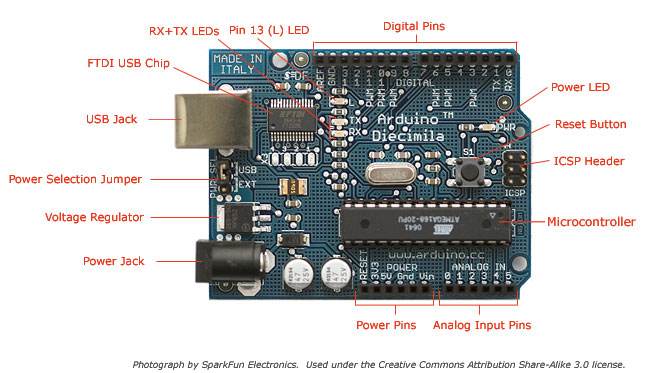 |
| Arduino board |
So if I actually dump that status to the LCD, then I should be getting (hopefully) the start up screen on the display.
The Arduino thing is a bit annoying. The 'IDE' is nice and easy if you just want a few simple bits, but try anything complicated and it just falls apart. The only way I can figure out to cross compile without abandoning it altogether is to #include the C files with a full path name (presumably because it copies source somewhere else - gawd knows). If you put the C files in the directory it compiles them, but bizarrely doesn't link them in. The Arduino is a great bit of hardware, and so is avr-gcc and avrdude, but the Arduino toolkit outside that is messy.
(One of the things I hate about the Mac is that there isn't a bl**dy key with a hash on it on the standard keyboard. So typing in #include or whatever means you have to press ALT 3. It's really annoying. The big keyboard has one but isn't wireless......)
The implementation is going to be pretty basic. I hacked the emulator so it dumped an include file line creating the ROM image in Arduino ROM if you precede the file name with an 'at'. That then is included into the source code which is compiled and uploaded.
Hardware Prototype
 |
| Microvision 2014 |
The shield plugs on the top, the beeper is connected to Pin 8, and the keyboard is connected as follows:
Arduino 13 -> Keyboard 3 (C0)
Arduino 12 -> Keyboard 1 (C1)
Arduino 11 -> Keyboard 5 (C2)
Arduino A5 -> Keyboard 2 (R0)
Arduino A4 -> Keyboard 7 (R1)
Arduino A5 -> Keyboard 2 (R0)
Arduino A4 -> Keyboard 7 (R1)
Arduino A3 -> Keyboard 6 (R2)
Arduino A2 -> Keyboard 4 (R3)
Leaving A1 free if I ever decide to implement the rotary control (which would just be a pot on there !). I make use of three libraries, Beep (included as standard) LCD4884 (v1.2) and Keypad
Leaving A1 free if I ever decide to implement the rotary control (which would just be a pot on there !). I make use of three libraries, Beep (included as standard) LCD4884 (v1.2) and Keypad
Release 11
A new release of the Emulator, for Windows and OSX and Linux probably. Source is in the OSX bundle.
What's new :-
For some reason the paddle control by mouse does not work under Windows. I don't know if this is SDL, VirtualBox (I build under XP/VirtualBox) or me - it seems to work perfectly under OSX and the code is very simple, a call to SDL to tell it to pass events on and a bit of code to change the rotary control in response to those events.
I will have a look later on.
Overlays have to be in .bmp format (same name as cartridge) unfortunately as it's the only format that SDL will load without support libraries.
What's new :-
- Support for Pinball Game
- Support for Overlays (included for Pinball)
- Paddle controllable by Mouse
- Game main display enlarged
For some reason the paddle control by mouse does not work under Windows. I don't know if this is SDL, VirtualBox (I build under XP/VirtualBox) or me - it seems to work perfectly under OSX and the code is very simple, a call to SDL to tell it to pass events on and a bit of code to change the rotary control in response to those events.
I will have a look later on.
Subscribe to:
Posts (Atom)